
Google’s 17 August 2026 Bidding Change: Why Your Best Campaigns Might Get Worse (and What to Do About It)

If you run Google Ads and one of your campaigns has been beating its target for months, this one is for you. Not because something is broken, but because something that has been working in your favour is about to stop.
From 17 August 2026, Google is changing how it bids on campaigns that are limited by budget and running a Target CPA or Target ROAS. For a lot of accounts, that means the quiet bonus performance you have been getting is about to disappear. The good news is you have time to decide what to do about it, and the fix takes minutes per campaign once you know what you are looking at.
Here is the plain-English version of the change, who it affects, and the exact steps to take before the deadline.
📌Something you won’t find so easily in Google support doc’s is that this smart bidding update is supposed to only apply to campaigns that are tagged “Limited by Budget” in the Status column. So on that note, I suggest, to review your results closely from August 17th, check the status column in your campaigns and then review the action plan plan in section 5 below!
Keep Calm and Carry On 💪🦁
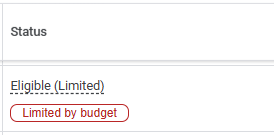
Table of contents
- What is actually changing
- Why your campaigns have been overperforming
- Who this affects, and who it doesn’t
- What happens if you do nothing
- Your options before 17 August
- The mistake to avoid: treating targets as a wishing well
- A word on scaling after the change
- What to do if you work with an agency or freelancer
- Frequently asked questions
What is actually changing
Today, when a campaign is limited by budget and uses a Target CPA or Target ROAS, Google often lets it perform better than the target you set. You might set a $10 target cost per lead and see $5 come back. You might set a 340% ROAS and watch the campaign run at 430%.
That happens because when the budget runs out before the day is done, the algorithm gets picky. It spends your limited budget on the cheapest, safest conversions it can find, which pushes your actual results past your stated target.
From 17 August 2026, Google will hold those budget-limited campaigns to the target you entered, and keep holding them to it even when you raise the budget. Google’s own example says it clearly: if your Target CPA is $10 but you have been running at $5, your campaign will start delivering closer to $10.
Google is not resetting your targets. It is not touching your budgets. It is simply going to start taking the number you typed in literally.
This applies to Search, Shopping, Performance Max, Demand Gen and Travel campaigns. It covers Target CPA and Target ROAS, plus Target CPC for Demand Gen campaigns.
Why your campaigns have been overperforming
This is worth understanding, because it tells you which campaigns to check first.
A budget-limited campaign is a campaign with more demand than money. There are more searches Google could show your ad on than your daily budget can pay for. When that happens under a target strategy, the algorithm cherry-picks. It buys the cheapest conversions available and leaves the more expensive ones on the table, because it does not have the budget to chase them anyway.
The result is an actual CPA below your target, or an actual ROAS above it. It looked like free efficiency. In reality it was a side effect of running out of money each day, and Google has decided that behaviour is confusing rather than helpful, especially when advertisers try to scale and cannot predict what they will get.
If this idea of demand versus budget is new to you, our guide on whether Google Ads is worth it for small businesses walks through how budget and targets interact.
Who this affects, and who it doesn’t
You are affected if a campaign is both:
- Marked “Limited by budget”, and
- Running Target CPA or Target ROAS (or Target CPC on Demand Gen).
You are most exposed if that campaign has been performing better than its target. That is the gap Google is closing.
You are not affected if any of these describe you:
- Your campaign is not limited by budget. Campaigns with enough budget already scale in line with their target, so nothing changes for them.
- You run Manual CPC, Maximise Conversions, or Maximise Conversion Value. These strategies have no target to hold you to.
- You use Target Impression Share, Target CPC on non-Demand-Gen campaigns, or Target CPM. These are outside the change.
The change also does not touch the Google Ads auction itself, and it will not push your spend past your budget. Your daily and monthly caps still hold.
What happens if you do nothing
Doing nothing is a valid choice, as long as you make it on purpose.
If you leave an overperforming campaign alone, its actual results will drift back toward the target you set. That $5 lead trends toward $10. That 430% ROAS trends toward 340%. For some businesses that is fine, because the target reflects what they actually need and the extra efficiency was a bonus they never planned around.
The danger is the target you forgot about. Plenty of accounts carry a Target CPA or Target ROAS that was set a year or two ago and never revisited, while the real performance quietly ran well ahead of it. If that describes one of your campaigns, doing nothing means volunteering to give back performance you did not realise you had. This is one of the more common Google Ads mistakes we see in accounts: a target on autopilot that no longer matches reality.
So the first job is not to change anything. It is to look.
Your options before 17 August
Google has spelled out four moves, and there’s a fifth we use inside client accounts when the situation calls for it. For each budget-limited target campaign, you are picking one.
Option 1: Keep your target and accept the drift. If the target genuinely reflects what your business needs, do nothing. Just go in with eyes open that performance will move toward that number.
Option 2: Lock in your current performance. If you want to keep that $5 lead or that 430% ROAS, lower your target to match what the campaign has actually been doing over the last 28 to 60 days. Set the Target CPA to $5, or the Target ROAS to 430%. This is the move for anyone who wants tomorrow to look like yesterday.
Option 3: Set a custom target. If neither the old target nor the recent actual is the right number, pick the one that is. Maybe $5 is too tight to scale and $10 gives away margin, so $7 is your number. Enter it.
Option 4: Prioritise volume instead of a target. If your budget is fixed and you just want the most conversions or the most revenue that budget can buy, switch off the target. Move Target CPA campaigns to Maximise Conversions, and Target ROAS campaigns to Maximise Conversion Value. You give up the target as a control, and in return you get everything that budget can squeeze out.
Option 5: Ladder up from where you actually are. If your actual performance is well short of the target, say a 250% ROAS against a 500% goal, don’t just switch to Maximise Conversion Value. That gap tells you the campaign hasn’t earned the freedom to run without a control. Set the target just above your current performance, around 275%. Let it stabilise, then lift the target another 15 to 25% every month or so as the data comes in. You’re teaching the system to climb one rung at a time, rather than asking it to leap.
This isn’t one of Google’s four official moves. It’s a practitioner move for when the honest answer is “we’re a long way from where we want to be, and Maximise strategies won’t take us there any faster.”
To help you choose, Google is rolling out a Bid Target Adjustment Tool inside your account from 6 July 2026. It surfaces the recent performance data next to your current target so you can see the gap and act on it in one place. If you do not see it yet, it is still deploying and will appear in the relevant campaign settings.
Not sure which lever fits your account? This is exactly the kind of call our team makes every day inside client accounts. You can book a free Google Ads audit and we will show you which of your campaigns are exposed and what we would do with each one.
The mistake to avoid: treating targets as a wishing well
Here is the trap. Because Google is promising more predictable performance against your target, it is tempting to read the update as: type in the CPA or ROAS you wish you had, and Google will deliver it. That is not what is happening.
Smart Bidding still runs on data, not hope. If you drop your Target CPA to a number your account has never actually hit, you will not conjure cheap conversions out of nowhere. You will choke the campaign. The algorithm will stop bidding on traffic it cannot win at that price, your volume falls, and you end up worse off.
The rule holds after 17 August exactly as it did before. Your target needs to be anchored to real account performance, and the strategy needs enough conversion data to learn from. As a rough guide, you want a solid base of conversions, think dozens a month rather than a handful, before a target strategy has enough signal to work with. Set a target your data supports, not a target you are dreaming of.
Think of it like coaching a fit rider up a climb they have almost cracked. Push the pace 10% and they find another gear. Tell them to go twice as fast and they blow up halfway. The target is a stretch goal grounded in what the legs can already do, not a wish.
A word on scaling after the change
One of the reasons Google gives for this update is that scaling budget-limited campaigns used to be unpredictable. Raise the budget and you never quite knew what you would get. After 17 August, a campaign should hold closer to its target as you add budget, which does make scaling cleaner.
That is genuinely useful. It does not mean you can throw the doors open. The safe way to scale a target campaign has not changed: lift the budget in steps of around 20% every five to seven days, then check that the target holds before the next step. Give the algorithm room to learn between moves rather than yanking the wheel. Our top tips for a new Google Ads campaign cover why patience beats speed when the system is still learning.
One more thing to watch. Google has said its planning tools, including Performance Planner, may return slightly off forecasts during the transition from 17 to 31 August. Treat any forecast in that window with a grain of salt.
What to do if you work with an agency or freelancer
If someone else runs your ads, you do not need to touch anything yourself. You just need to know they are on it.
Send them one message: “What’s our plan for the 17 August Google Ads bidding change?” A good manager already has an answer, campaign by campaign, and can tell you which accounts are exposed and what they are doing about each one. Vague reassurance is a flag. Specifics are what you want.
At Digital Autopilot we have already reviewed our clients’ budget-limited target campaigns and set a plan for each one, because for high-value accounts the difference between acting and not acting shows up directly in the leads and revenue you get for the same spend. If you are not confident your current setup is being watched this closely, that is worth fixing before the 17th, whether that is with us on Google Ads management or with whoever you work with now.
Frequently asked questions
What is changing with Google Ads bidding on 17 August 2026?
Google is updating how it bids on campaigns that are limited by budget and use a Target CPA or Target ROAS (or Target CPC on Demand Gen). Today these campaigns often perform better than their target. From 17 August 2026 they will optimise toward the target you set, even when you raise the budget. Google will not automatically change your targets or budgets.
Which campaigns are affected?
Campaigns that are both marked “Limited by budget” and using Target CPA, Target ROAS, or Target CPC (Demand Gen only). It applies across Search, Shopping, Performance Max, Demand Gen and Travel campaigns. Campaigns that are not limited by budget are not affected.
Will this increase my ad spend?
No. Your daily and monthly budget limits are always respected. The change is about aligning performance with your target, not about spending more.
Does this change the Google Ads auction?
No. This is a bidding change only. The way the auction ranks ads and sets prices does not change.
What happens if I do nothing?
If a campaign has been performing better than its target, its actual results will drift back toward that target after 17 August. For example, a campaign running at a $5 CPA against a $10 target will trend toward $10. If the target still reflects your business goals, that may be fine. If it is an old target you have not revisited, you will give back performance you did not know you had.
What is the Bid Target Adjustment Tool?
It is a tool inside Google Ads, available from 6 July 2026, that shows your recent campaign performance next to your current target so you can review and update targets before the change takes effect. If you cannot see it yet, it is still rolling out to accounts.
Should I lower my target or switch to Maximise Conversions?
Lower your target if you want to keep your current efficiency and still use the target as a control. Switch to Maximise Conversions or Maximise Conversion Value if your budget is fixed and you simply want the most conversions or revenue that budget can produce, and you are comfortable giving up the target as a lever.
Can I just set a really aggressive target and get better results?
No. Smart Bidding still needs real data. Setting a target your account has never achieved will usually reduce your volume rather than improve efficiency, because the system stops bidding on traffic it cannot win at that price. Anchor your target to your actual 28 to 60 day performance.
How long until performance settles after I change a target?
Smart Bidding reacts to target changes in real time, but you should wait one to two conversion cycles before judging the results in your bid strategy report. Also note that Google’s forecasting tools may be less accurate between 17 and 31 August.
I use Manual CPC or Target Impression Share. Am I affected?
No. The change applies to Target CPA and Target ROAS (and Target CPC on Demand Gen). Manual CPC, Target Impression Share, Target CPM and Maximise Conversions or Conversion Value strategies are not affected.
Want a second set of eyes on your account before 17 August? Get a free Google Ads audit from Digital Autopilot and we will tell you exactly which campaigns are exposed and what to do with each one.