
Let’s be honest: in the legal world, time is billable, and wasted marketing budget is a crime.
As we enter 2026, the digital landscape is shifting fast. AI is changing search, and competition is fierce. However, the fundamental truth remains: when someone needs a lawyer, they usually need one yesterday, and they go to Google to find them.
But here’s the catch: legal keywords command some of the highest costs per click on the planet. One wrong campaign setting, one poorly structured ad group, or one missing piece of conversion tracking can burn through your ad spend faster than you can say “objection.”
We’ve been managing Google Ads for law firms since 2014, and we’ve seen it all – the wins, the disasters, and everything in between. This guide distills what we’ve learned into a practical, step-by-step roadmap for running successful Google Ads campaigns that you can actually use.
We’re going to cover:
- How Google Ads actually works for law firms (and why the budget needs to be realistic)
- Setting up campaigns the right way from day one
- Keywords, ad groups, and the “kill list” of negative keywords that protect your spend
- Writing ads that get clicks from serious prospects, not tire-kickers
- Landing pages that convert expensive clicks into quality leads
- Conversion tracking – especially call tracking, which is absolutely critical for legal services
- Optimisation strategies that compound results over months and years
- Advanced tactics like automated bidding and Performance Max
By the end, you’ll have a clear roadmap – plus practical “Action lists” at the end of each section so you can implement step by step.
Let’s get started.
Table of Contents
KEY TAKEAWAYS
- Budget Reality: Legal keywords cost $10-$100+ per click. Minimum recommended budget is $100-300/day ($3,000-9,000/month) for 3-6 months to see meaningful results.
- Conversion Tracking: 70-80% of legal leads come via phone calls, not forms. Dynamic call tracking (e.g., CallRail) is essential to track which keywords and ads generate quality leads.
- Landing Pages: Dedicated landing pages convert 5-15% vs. 1-3% for generic homepages. Include clear headline, visible phone number, real lawyer photo, and prominent CTA above the fold. 70-80% of traffic is mobile.
- Campaign Structure: Start with Manual CPC bidding and Google Search Network only. Use tightly themed ad groups (5-15 keywords) with phrase match and exact match keywords. Add negative keywords immediately (free, jobs, DIY, pro bono).
- Quality Score Impact: Higher Quality Score dramatically lowers cost per click. Poor Quality Score can mean paying $70 vs. $40 for the same ad position in expensive legal markets.
- Optimisation Timeline: Wait 3-6 months before major optimisation. Focus monthly reviews on location performance, search terms, device data, and call tracking. Make 3-5 changes at a time, wait 2-3 weeks to measure impact.
- ROI Reality: One client can be worth $10,000-$50,000+. With $5,000/month ad spend generating 10 leads (2-3 conversions at $30,000 average case value), ROI is strongly positive.
- What NOT to Do: Don’t send traffic to your homepage. Don’t skip negative keywords (free, jobs, DIY, pro bono). Don’t run ads when you can’t answer the phone. Don’t ignore the Search Terms Report. These mistakes burn thousands in wasted ad spend.
- Use Ad Extensions: Use all available extensions (sitelinks, callouts, call extension, location, structured snippets). Ads without extensions get beaten by competitors and look bare on search engine results pages. Google doesn’t charge extra – there’s no reason not to use them.
- AI and Automation Tools: Don’t use automated bidding (Maximise Conversions, Target CPA) or Performance Max until you have consistent conversion data—minimum 50+ conversions per month. AI needs data to learn. Starting with automation too early wastes budget on the algorithm’s “learning phase” with no historical data to guide it.
How Google Ads Works for Law Firms
The Basics and Why It Works
Google Ads is straightforward: you bid on keywords, and when someone searches those terms, your ad appears at the top of Google’s search results. You pay when someone clicks.
Here’s why it works so well for legal services:
When someone searches “long-term disability lawyer” or “insurance claim denied attorney,” they’re not browsing for fun. They have a problem, they need it solved, and they’re actively looking for help right now. That’s high-intent traffic.
Unlike SEO for lawyers (which can take 6-18 months to show big results), Google Ads gets you in front of these people immediately—sometimes within hours of launching your campaign.
The Google Ads auction:
Every time someone searches, Google runs an instant auction among all advertisers bidding on that keyword. But it’s not just about who bids the highest. Google also looks at your Quality Score – a measure of how relevant your ad and landing page are to the search.
Quality Score matters because higher Quality Score = lower cost per click. It’s based on ad relevance, landing page experience, and expected click-through rate. In expensive legal markets, a competitor with a Quality Score of 8 might pay $40 per click while you pay $70 for the same position with a score of 4. Over a month, that’s the difference between $4,000 and $7,000 for 100 clicks.
Pricing models:
Google Ads offers Cost-Per-Click (CPC) and Cost-Per-Thousand Impressions (CPM). For lawyers, CPC dominates because you only pay when someone actually clicks your ad and visits your site. You’re not paying for eyeballs; you’re paying for action.
CPM makes sense for brand awareness campaigns, but that’s not what most law firms need. You need leads.
The Budget Reality Check
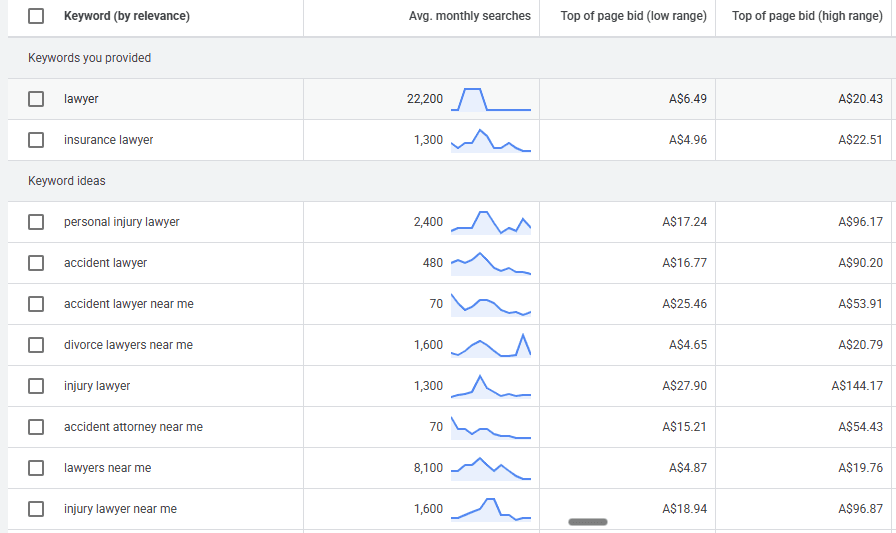
Legal keywords are expensive. Depending on your practice area and location, expect to pay:
- $10-$15 per click in less competitive areas
- $30-$50 per click in moderate competition
- $50-$100+ per click in highly competitive markets (personal injury in major cities)
Why? Because one client can be worth $10,000, $50,000, or more. Everyone knows the math works, so everyone’s bidding aggressively.
Here’s the reality: If you’re spending $20 per day, you might get one or two clicks. That’s not enough to generate meaningful data, let alone consistent leads for your law firm.
For serious testing and actual results, you need to budget at least $100-300 per day ($3,000-9,000 per month) in most legal markets.
Why?
- You need enough clicks to get actual leads
- You need enough leads to see patterns in the data
- You need enough data to make smart optimisation decisions
The good news is, one personal injury case can be worth $10,000-$50,000+. If your average case value is $30,000 and you spend $5,000/month to generate 10 leads (2-3 becoming clients), the math works beautifully.
The key is tracking everything accurately so you know exactly what you’re getting for your advertising spend.
Action Checklist:
- Calculate your average case value to determine acceptable cost-per-acquisition
- Set realistic budget expectations (minimum $100-300/day for most legal markets)
- Understand that automated bidding needs data – you’ll start with manual
- Ensure sustainable ad spend for 3-6 months minimum (optimisation takes time)
Part 1: Strategy and Preparation
Before we even log into Google Ads, we need to build our case. You wouldn’t walk into a courtroom without a strategy, and you shouldn’t launch an ad campaign without one either.
Finding Your Point of Difference
The market is crowded. Why should a client choose you? You need to be able to communicate this clearly in your ads and landing pages, or you’ll burn through budget on generic messaging that doesn’t convert.
What area of law are you focusing on?
Start with one. Pick the practice area where:
- You have the strongest track record
- The case values justify the ad spend (high enough to cover expensive clicks)
- You genuinely want more clients
- You have clear differentiators
Whether it’s personal injury, family law, criminal defence, or long-term disability claims, you can always expand later once you’ve proven the model works. But starting focused gives you the budget concentration and message clarity you need to compete.
Who is your ideal client?
Get very specific. What is their situation? What problem are they facing right now? What are they worried about?
Understanding this helps you write ad copy and landing pages that speak directly to them and their situation. Generic messaging like “experienced legal representation” doesn’t connect. “Insurance Company Denied Your Disability Claim? We’ll Fight to Get You the Benefits You Deserve” does.
What’s your core point of difference?
“We’re experienced and we care about our clients” isn’t a differentiator – everyone says that.
Think about:
- Specialisation: Exclusive focus on one type of case
- Experience: “15+ years focusing only on long-term disability claims”
- Access: Clients talk directly to partners
- Fee structure: “No win, no fee”
- Response time: Call back within hours
- Track record: “$50M+ recovered” or “500+ claims won”
- Inside knowledge: Former insurance company lawyers
Brainstorm and pick 2-3 that are genuinely different and provable.
The Review Hack for Messaging
If you aren’t sure what your “hook” is, your Google reviews contain marketing gold.
Go to your Google Reviews (or use a free tool to scrape them). Export the text and pop it into your favourite AI tool to analyse.
Use this prompt in ChatGPT: “Analyse these Google reviews and identify the most frequently mentioned positive themes and phrases.”
What typically emerges:
- “Explained everything clearly in plain English”
- “Fought hard when everyone said I had no chance”
- “Completely transparent about fees”
- “Always responsive – got back to me same day”
- “Handled everything so I didn’t have to stress”
Use these insights to craft your Unique Selling Proposition (If you offer “No Win, No Fee,” that is a non-negotiable inclusion) and then use them in your ads and landing page copy. It’s authentic because it’s what real clients are actually saying about you.
Keyword Research Foundation
Keyword research for Google Ads is finding the specific words and phrases people type into Google when searching for products or services like yours. You choose these targeted keywords to trigger your ads, so you’re only paying to show ads to people actively searching for what you offer.
The goal is to identify relevant keywords with strong buying intent that are relevant to your business, affordable to bid on, and likely to convert into customers.
Think like a client, not a lawyer. You might describe your service as “insurance claim litigation for long-term disability benefits denial.” Your prospective clients search: “insurance won’t pay disability claim” or “LTD claim denied need lawyer.”
Start with core terms:
Using long-term disability claims as an example:
- “LTD lawyer”
- “long term disability attorney”
- “disability insurance lawyer”
Then add problem-specific variations:
- “denied disability claim attorney”
- “insurance claim denied lawyer”
- “disability insurance won’t pay”
Then location modifiers:
- “disability lawyer Sydney”
- “disability lawyer near me”
Build a list of 20-30 terms covering your core service, the problem they’re facing, intent to hire someone, and location.
Tools to use:
Google Keyword Planner:
Go to Tools → Keyword Planner → Discover New Keywords. Enter seed keywords and see related keywords, search volumes, and competition levels.
ChatGPT or Gemini:
“Generate 30 keyword variations for a long-term disability law firm in Melbourne that helps clients with denied insurance claims.” The AI will give you a solid starting list. Not all will be relevant, but it’s faster than brainstorming manually.
Competitor websites:
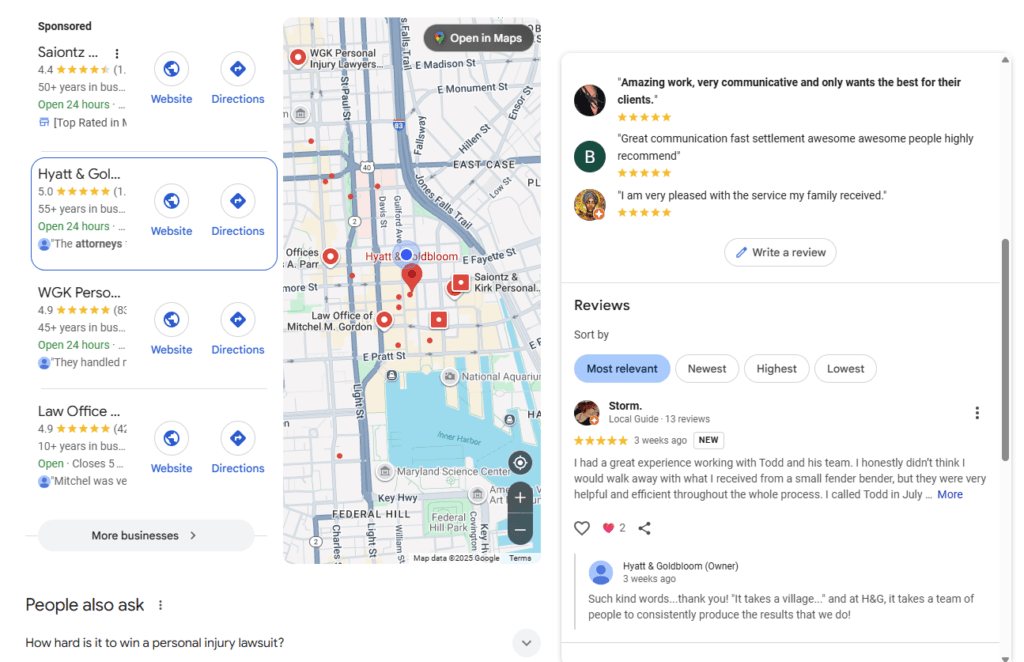
Look at 3-4 competitor law firms in your area that are running Google Ads (they’ll appear at the top of search results with “Ad” or “Sponsored” labels).
Visit their websites and look at:
- Page titles (shows in browser tab)
- Headers and sub-headers
- Service page names
- The language they use to describe what they do
They’ve likely already done keyword research and it’s just smart to look at what’s already working.
Get 20-50 solid core terms and you’re ready to move forward. The keyword list you start with won’t be perfect – and that’s fine. Google Ads is iterative. You’ll learn what works, add more winners, and cut the losers. But you need these initial keywords to get started.
Action List: Strategy and Preparation
- Choose ONE practice area to focus on initially (you can expand later)
- Define your USP: Write down 3 reasons why you are better than the firm across the street that you’ll use in your ad copy and landing pages
- Research Keywords and competitors: Generate a list of core terms (e.g., “LTD lawyer,” “Insurance claim denied”)
Part 2: Campaign Setup and Settings
Structure and Networks
Campaign naming: Use clear naming like “Search – LTD – Melbourne” so you know at a glance what each Google Ads campaign does.
Campaign type: Choose “Search” campaign.
Network settings (critical): Stick to the Google Search Network. When you set up a Search campaign, Google will try to get you to check boxes for “Search Partners” and “Display Network.” Uncheck both.
Search Partners are other search engines that use Google in the back end to provide their results. They can sometimes bring cheaper but lower-quality traffic. Display Network shows ads on websites and apps where people aren’t necessarily searching for a lawyer. You want high-intent searchers, not someone browsing a news site. You can test these down the track when you have results coming through and a strategy to expand into display ads.
Geographic targeting: Be precise. Start with your main city or a specific radius around your office. Exclude areas you don’t serve. Every click costs money. Don’t pay for someone in Perth when you only take Melbourne clients.
Ad scheduling: If you have a limited budget, ideally run ads only when you can answer the phone (like Monday-Friday, 8 AM – 7 PM). If someone clicks your ad at 9 PM and gets no answer, you just paid $50-100 for a lost lead. You can expand to more flexible times or 24/7 later once you have data.
Bidding Strategy
Start with “Manual CPC” (Manual Cost-Per-Click).
Why? Automated bidding (AI) needs data to work. In the beginning, you have no data. Manual bidding gives you control so you don’t accidentally spend $150 on a single click before you’re ready.
Legal clicks are not cheap and in some niches/locations, $50–$100+ per click is normal for ads for lawyers.
That means if you only spend $20/day, you might get 1–2 clicks which means no meaningful data, nor continuity in terms of brand exposure. For serious testing, expect to commit hundreds of dollars per day (depending on your market, competition and goals)
You don’t have to start massive on day one, but you do need enough budget to:
- Generate a decent number of clicks
- See actual leads and calls
- Know what’s working (and what isn’t)
We have seen legal clients who we have managed and optimised over many years manage on $100/day in some areas of practice.
Once you have consistent conversions tracked, you can test switching to “Maximise Conversions” or “Target CPA” or “Target ROAS” (if you have solid history)
You’ll do that through experiments (we’ll come back to this).
Action List: Campaign Settings
- Select Network: Ensure only “Search Network” is checked
- Set Location: Target your specific city/radius. Exclude other countries/states
- Set Schedule: Match your business hours initially
- Set Bid Strategy: Select “Manual CPC” (you may need to click “Select a bid strategy directly” to find this)
Part 3: Keywords and Ad Group Structure
Imagine your Google Ads account is a filing cabinet. If you throw every document for every case into one folder, you are negligent. You need a “Siloed” structure.
Theme-Based Ad Groups (Not Mixed Keyword Dumps)
Don’t dump 100 keywords into one ad group. Organise keywords into tightly themed ad groups.
When you group related keywords together, you can write compelling ads that specifically match what someone searched for. Google rewards relevance with higher Quality Scores and lower costs.
Example Structure for LTD Practice
Core LTD ad group:
- “LTD lawyer”
- “long term disability lawyer”
- “LTD law firm”
Denials & claims ad group:
- “lawyer for denied disability claim”
- “insurance claim denial lawyer”
- “disability insurance claim dispute lawyer”
“Near me” ad group:
- “disability lawyer near me”
- “LTD lawyer near me”
- “insurance lawyer near me”
(Optional) Other sub-niches:
- Specific conditions or scenarios
- Location-modified phrases (“sydney disability lawyer”, etc.)
Each ad group has a clear theme. In the “Denials & Claims” ad group, every headline can reference denied claims and fighting insurers. In the “Near Me” ad group, every ad can emphasise local presence. You avoid mismatched ads like “Sydney” ads showing to “Melbourne” searchers.
Aim for 5-15 closely related keywords per ad group. Some law firm Google Ads specialists recommend single keyword ad groups (SKAGs), where each ad group contains just one keyword with multiple match types. This gives you maximum control over which ad appears for which search, though it requires more management time.
Start with 5-6 ad groups and add more later as you get data.
Match Types Explained
When you add keywords to your Google Ads campaign, you need to choose a match type. This controls how closely the search query needs to match your keyword for your ad to appear.
Broad Match: Your ad appears for searches related to your keyword, including synonyms and related searches. Most flexible but least controlled. Example: Keyword “car accident lawyer” might trigger ads for “auto injury attorney” or “vehicle crash legal help.”
Phrase Match: Your ad appears when someone searches for your keyword phrase (or close variations) with additional words before or after. Example: Keyword “car accident lawyer” triggers for “best car accident lawyer Sydney” but not “lawyer for accidents.”
Exact Match: Your ad appears only when someone searches for your exact keyword or very close variations. Most control, least reach. Example: [car accident lawyer] triggers only for that specific phrase.
For law firm marketing, we recommend starting with phrase match keywords and exact match for your highest-priority terms. Broad match can work once you have a solid negative keyword list in place, but it’s risky early on.
Action list: Part 3 Keywords & Structure
- Brainstorm core search terms clients would use
- Use Keyword Planner and/or AI tools to expand the list
- Group keywords into tightly themed ad groups, such as:
- Core practice area
- Denials/claims
- “Near me” searches
- Consider single keyword ad groups for maximum control
- Set match types appropriately (start with phrase match and exact match)
- Avoid large mixed ad groups; aim for relevance and control
Part 4: Negative Keywords (The Defence)
This is how you protect your budget. Negative keywords are words you tell Google you do not want to show up for, because legal campaigns attract all sorts of irrelevant searches if you’re not careful.
Every irrelevant click costs you real money. In legal marketing where clicks can cost $50-100+, wasted clicks can add up to thousands per month.
The “Kill List”
Add these immediately to your negative keyword list:
Low-Intent Searches: free, pro bono, volunteer, course, school, training, class, job, career, salary, template, form, DIY, sample, example
Wrong Practice Areas: Any areas you don’t practice (criminal, divorce, family law if you don’t do it, immigration, etc.)
Geographic Exclusions: Cities/suburbs outside your service area
Competitor Names: Other law firm names in your area (unless you have a specific aggressive strategy)
Use ChatGPT: “Generate a comprehensive list of negative keywords for a long-term disability law firm that wants to avoid: job seekers, students, people looking for DIY legal help, and people seeking free legal advice.”
Review your Search Terms Report weekly (first month), then monthly. You’ll find bizarre searches you never imagined. Add them as negative keywords immediately to protect your PPC campaign.
Action List: Negative Keywords
- Add the essential “kill list” negatives to your campaign immediately (free, jobs, courses, DIY, etc.)
- Brainstorm Negatives and/or Use ChatGPT to generate a list of “low intent” legal terms
- Add competitor law firm names as negatives
- Generate a list of suburbs/cities outside your service area and add as negatives
- Regularly review the search terms report:
- Add new negatives for irrelevant queries
- Spot new high-intent keywords to add
Part 5: Writing High-Converting Ad Copy
Your ads are often the first impression of the firm and you have milliseconds to get their attention. And in legal, people are not casually browsing for fun. They’re stressed, in pain, or frustrated at an insurer.
You need to write compelling ad copy that includes:
- Compelling headlines
- Emotionally resonant descriptions
- Clear, confident calls to action
Before you start writing, you need to understand the constraints you’re working with.
Character Limits and Headline Mix
Google Ads character limits:
- Headlines: Maximum 30 characters each (you can add up to 15 headlines)
- Descriptions: Maximum 90 characters each (you can add up to 4 descriptions)
Google mixes and matches your headlines and descriptions to figure out which combinations get the most clicks and conversions. Write 10-15 headlines covering different angles.
The five types:
- Keyword-Centric: “Long-Term Disability Lawyer”
- Benefit-Focused: “Claim Denied? We Fight Back”
- Emotional/Reassurance: “We Stand Up To Insurers”
- Proof/Trust: “500+ Disability Claims Won”
- Call-to-Action: “Free Case Assessment”
Mix them within each ad group, but keep relevance high.
Dynamic Keyword Insertion
Dynamic keyword insertion (DKI) is an advanced feature that automatically inserts the searcher’s actual query into your ad copy. This makes your ad appear highly relevant and can boost click-through rates.
Example: If your headline is “Expert {KeyWord:Lawyer} in Sydney” and someone searches “car accident lawyer,” the ad appears as “Expert Car Accident Lawyer in Sydney.”
Use DKI sparingly and carefully. It can backfire if it creates awkward phrasing or if you don’t have proper negative keywords in place. For lawyers Google Ads campaigns, test it on one ad variation while keeping standard ads running.
Descriptions and Mobile
Descriptions give you more space (90 characters vs 30), so you can expand on your message.
Use descriptions to reassure, highlight experience, call out differentiators, emphasise social proof, and make the next step obvious.
Example themes:
- Over 15 years helping clients win disability benefits
- No win, no fee – we only get paid if you do
- Hundreds of 5-star Google reviews from satisfied clients
- Free consultation – speak directly to a lawyer
Critical: 70-80% of legal searches happen on smartphones. Keep copy concise, direct, and action-oriented. Phrases like “Call Now” work well because on mobile, the phone number is clickable.
Ad Extensions
Ad extensions add extra information to your ads, and they give you more real estate on the search engine results pages. An ad without extensions looks bare and gets beaten by competitors who use them. Google doesn’t charge extra for extensions. Use them all.
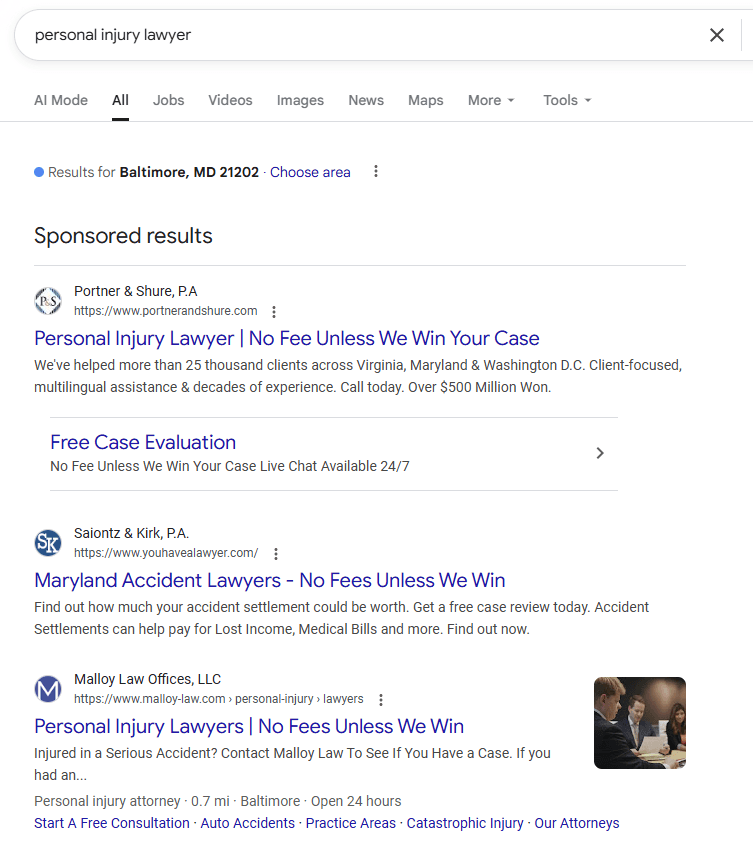
Extensions to set up:
- Sitelinks: Additional links below your main ad (About Our Firm, Case Results, Client Reviews, Free Consultation)
- Callout Extensions: Short benefit snippets (No Win No Fee, 15+ Years Experience, 5 Star Google Rating, Free Case Assessment)
- Structured Snippets: List services or practice areas
- Call Extension: Displays phone number (clickable on mobile – crucial for law firms)
- Location Extension: Shows your address via Google Business Profile
- Image Assets: Real photos of lawyers, team, office (NOT stock images)
- Logo & Business Name: Upload firm logo
Using ad extensions properly is one of the key elements of effective Google Ads campaigns for law firms.
Action list: Ad Copy & Assets
- Draft 10–15 headlines per ad group:
- Mix of keyword, benefit, emotional and brand themes
- Draft 3–4 strong descriptions emphasising:
- Experience
- Results
- Reviews
- “No win, no fee” (if applicable)
- Consider testing dynamic keyword insertion on one ad variation
- Build out:
- Sitelinks (with descriptions)
- Callouts
- Structured snippets
- Call + location extensions
- Logo and image assets
- Keep testing new variations over time
Part 6: Landing Pages That Convert
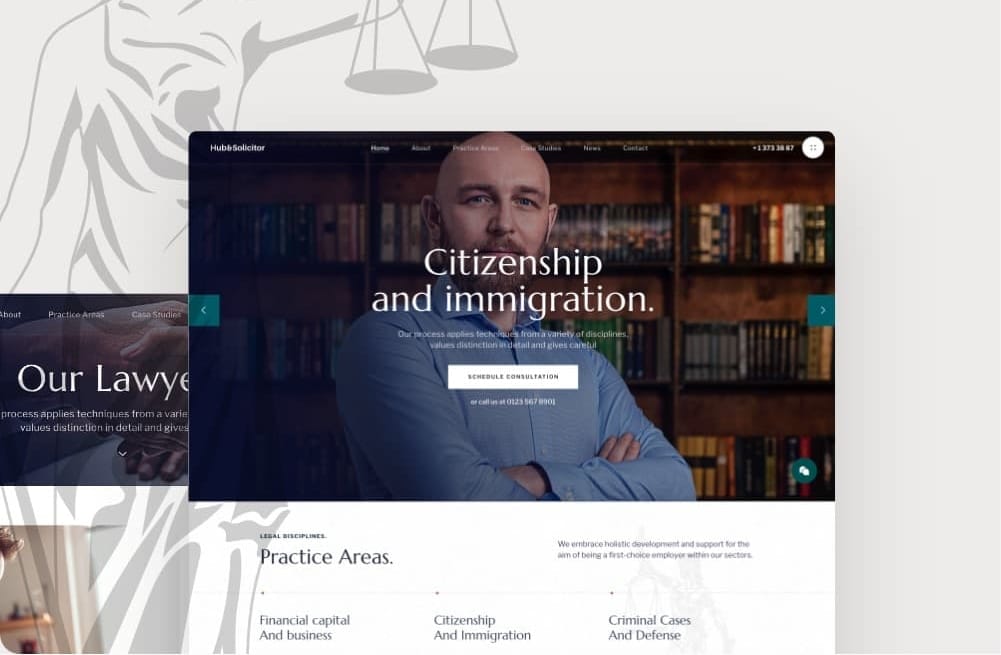
Here is a tragedy we see often: A lawyer builds a great Google Ads campaign, pays for the click, and then sends the user to… the generic Home Page.
Do not do this.
Once someone clicks your ad, the landing page has one job, and that is to make it easy and compelling for the right people to contact you.
Match the message
If the keyword and ad are about long-term disability insurance claims, the landing page should clearly be about:
- Long-term disability
- Insurance disputes
- Denied claims
No generic “We’re a law firm that does 18 different things” homepages.
Above-the-Fold Essentials
You have about 3 seconds to convince them to stay. When someone lands, they should instantly see:
1. Clear, Emotionally Resonant Headline
“Injured? Insurance Company Not Paying? We Fight for Your Long-Term Disability Benefits.”
Meet them where they are emotionally. Acknowledge their situation and show you can help.
2. Supporting Subheading
One or two sentences explaining briefly how you help and what makes you different.
3. Key Proof Points (3-4 bullets)
- Years of experience
- Number of cases won
- Total settlement amounts (if you’re comfortable sharing)
- 5-star review count
4. Prominent Call-to-Action
Big button: “Get Free Case Assessment” or “Book Free Consultation”
Plus a large, clickable phone number (especially on mobile where 70-80% of traffic comes from).
5. Real Photo
The lawyer who will handle their case or a team photo. NOT stock photos.
Below the Fold
Not everyone will scroll. But the people who do are seriously considering you. Give them what they need to make a decision.
Service Explanation:
A few paragraphs on what you do, types of cases, and your approach. Keep it clear and benefit-focused.
Case Studies:
Real examples build credibility. You don’t necessarily need full case studies, they can be snapshots. Here’s a formula you can follow for compelling case studies for personal injury cases or other practice areas:
- Case summary
- Challenge
- How you helped
- Result
Keep each example to 3-4 sentences. Show different types of cases so people can see themselves in the examples.
Visual Process Explanation:
Uncertainty is a killer of conversions and people want to know what happens when they contact you. Lay it out simply with 3-4 simple steps explaining what happens when they contact you. E.g.:
- Step 1: Free consultation – we review your case and explain your options
- Step 2: We gather evidence and build your claim
- Step 3: We handle all communication with the insurer
- Step 4: We fight for the maximum benefits you deserve
Use icons or simple graphics if you can.
Real Team Photos:
More photos of actual lawyers and staff. Show the office. Humanise the firm. People are nervous about hiring a lawyer. Seeing real faces, real people, makes it less intimidating.
Trust Signals to Build Authority and Trust:
- Accreditations (bar association memberships, certifications)
- Association logos (legal associations you belong to)
- Awards or recognition
- Industry certifications
FAQ Section:
Answer 5-8 questions people typically ask. E.g.:
- “Do you work on a no win, no fee basis?”
- “How long will my claim take?”
- “What does it cost to get started?”
Keep answers concise but thorough. Don’t use legal jargon – write like you’re explaining it to a friend.
Multiple CTAs Throughout:
Every 1-2 sections, include another call-to-action such as “Book Free Case Review”, “Call Now”
Make them visible but not obnoxious. You want to make it easy to take action without feeling pushy.
Landing Pages are Worth Investing In
Your landing page is your 24/7 salesperson. A good one converts 5-15% of visitors. A bad one converts 1-3%. When you’re paying $50-100 per click, that difference is massive.
It’s worth it to invest in your landing page with professional copywriting, clean design, real photography, fast loading and mobile optimisation.
Action List: Landing Pages that Convert
- Create a dedicated landing page for each main practice area (e.g. LTD claims)
- Above the fold, ensure you have:
- Strong, relevant headline
- Clear USP bullets
- Visible phone number and/or form CTA
- Real lawyer/team photo
- Below the fold, add:
- Case snapshots
- Process overview
- Team photos & accreditations
- FAQs
- Make sure:
- The page is fast, mobile-friendly and secure
- Forms redirect to a thank you page (for tracking)
Part 7: Conversion Tracking (The Evidence)
If you aren’t tracking, you are guessing. For law firms, approximately 70-80% of leads come via phone calls, not form fills. Plus, in legal, every lead is expensive. You can’t afford to guess what’s working.
You need at least:
- Form tracking (free consult, case assessment, contact forms)
- Phone call tracking that ties back to keywords, ads and locations
Setting Up Website Conversion Tracking
Set up Google Ads (or Google Analytics) conversions for:
- Free consultation or case assessment form submissions
- General contact form submissions
- Any other high-intent actions (e.g. “Request a call back”, call button clicks)
Make sure that each form redirects to a thank you page – this makes tracking simpler and cleaner and that the thank you page clearly explains what happens next.
Dynamic call tracking (e.g. CallRail)
This is especially powerful for law firms. We’ve found the best legal campaigns perform thanks to the accuracy of the tracking, particularly from dynamic call tracking.
With dynamic call tracking, you can:
- Swap phone numbers dynamically based on traffic source
- See which campaigns, ad groups and keywords generated calls
- Feed data back to Google to help the algorithm find more people like those who called you
- Listen to call recordings to assess lead quality
- See:
- Call duration
- Caller location
- Time of day
- Channel (Google Ads vs organic vs direct)
One law firm we’ve worked with for close to a decade has turned Google Ads into an enquiry machine:
- Competing with much larger firms
- On smaller budgets
- Because call tracking lets us refine, adjust, and continually funnel more budget into what generates long, high-quality calls – not just “clicks”
Recommended tool: CallRail (integrates directly with Google Ads, easy setup, starts around $45/month).
Accurate tracking means you can:
- Spend more where profitable
- Pause or reduce spend where it’s not
- Justify a strong ongoing ad investment
Action List: Conversion & Call Tracking
- Set up conversion tracking for all high-intent forms (with thank you pages)
- Implement dynamic call tracking (e.g. CallRail)
- Test all conversions to ensure:
- They fire correctly
- They appear in Google Ads
Part 8: Optimisation and Growth (3-6 Months+)

Fast forward. You have been live for 3-6 months. Congratulations, you now have data. Now we can really optimise your successful PPC campaign.
What to Analyse
1. Days & Hours Performance
Go to your campaign, click on the “Ad schedule” tab, and look at performance by day and hour in your Google Ads dashboard.
Questions to ask:
- Which days drive the most conversions?
- Which hours bring quality leads vs. just noise?
- Are weekends worth running ads, or should you focus on weekdays?
- Is there a specific 2-3 hour window that consistently performs best?
Don’t just look at clicks. Look at conversions and cost-per-conversion.
You might find that Wednesday afternoons drive tons of clicks but zero conversions. Cut back spend there. Maybe Sunday mornings get few clicks but high conversion rates. Increase bids there.
2. Device Performance
Check how mobile, desktop, and tablet perform differently.
Go to Devices tab in your campaign. Look at:
- Is mobile generating more calls? (It probably is – 70-80% of legal searches are mobile)
- Are the calls from mobile quality calls? (Check call tracking data)
- What’s the cost-per-conversion on each device?
If mobile drives 80% of your calls and has a lower cost-per-conversion than desktop, you might increase mobile bids by 10-20% and decrease desktop bids.
3. Demographics (Where Available)
If you have enough data, Google will show age and gender breakdowns.
Check for patterns:
- Are certain age brackets converting better?
- Gender combinations that perform best?
- Household income data (sometimes available)?
This is less critical than other metrics for legal, but if you notice a strong pattern (like 45-54 age group converts 3x better than 25-34), you can adjust bids accordingly.
4. Location Performance
This is huge for local law firms running Google Ads for law practices.
Go to Locations tab. Look at performance by city, suburb, or postcode.
Which areas produce:
- The most conversions?
- The lowest cost-per-conversion?
- The longest calls (check call tracking)?
You might find that certain suburbs 15km from your office consistently produce quality leads, while others closer to you don’t.
Increase bids in high-performing locations. Consider excluding or reducing bids in areas that burn budget without results.
5. Search Terms Report (Critical)
This shows the actual law related search terms that triggered your ads – not just the keywords you’re bidding on.
Go to Keywords tab → Search Terms.
You’re looking for two things: New high-intent phrases to add as keywords:
Maybe you’re bidding on “LTD lawyer” and you see people are also searching “long term disability claim help” or “can’t work due to disability lawyer.” Those are variations you should add as keywords.
Irrelevant terms to add as negatives: You’ll find bizarre stuff in there. People searching things you never imagined. Add them as negative keywords immediately.
Do this monthly. It’s ongoing work, not one-and-done.
6. Ad Performance Testing
If you created 2-3 ad variations per ad group (which you should have), now you can see which performs better. Look at:
- Click-through rate (CTR): Which ad gets more clicks?
- Conversion rate: Which ad drives more calls/forms?
- Cost-per-conversion: Which ad is most cost-efficient?
When running tests, don’t test completely different ads at once. Test small changes. For example:
- Ad A: Baseline ad
- Ad B: Same as Ad A, but pin certain headlines/descriptions to specific positions to test if order matters
- Ad C: Same as Ad A, but with more emotional messaging in one headline
Change one variable at a time. Let tests run for at least 3-4 weeks (longer is better). Then declare a winner and test something else.
Using Call Tracking Data
Google Ads data is great, but call tracking data is where you find gold for ads for law firms.
Export detailed call logs from CallRail. Go to your call tracking dashboard and export call data. You’ll get a spreadsheet with:
- Campaign name
- Ad group
- Keyword that drove the call
- Call duration
- Time and date
- Caller location (city, suburb)
- Source (Google Ads vs organic vs direct)
- Link to call recording (if enabled)
Focus your analysis on on calls longer than 2 minutes. These are your serious prospects. Filter for calls over 2-3 minutes and analyse:
- Which keywords drove them?
- Which locations do they come from?
- What time of day?
Filter out duplicate calls from the same phone number. If someone calls three times, that’s one lead, not three. Make sure you’re not counting them multiple times in your analysis.
Advanced Data Analysis with AI Tools
Here’s where it gets powerful: combine your Google Ads data with your call tracking data and analyse it together.
The process:
- Export your Google Ads location report (Locations tab → Download)
- Export your CallRail call log with all details
- Upload both to ChatGPT or Gemini
Sample AI prompt:
“Analyse these two data sets: a Google Ads location report and CallRail call data. Identify which locations deliver the longest calls (indicating highest quality leads). Ignore repeat calls from the same phone number. Show me the top 10 locations to focus budget on, with supporting metrics like average call duration, number of calls, and conversion data.”
The AI will cross-reference the data and give you insights you might have missed manually.
Other useful AI prompts:
- “Identify keyword themes that generate calls over 3 minutes in duration.”
- “Find patterns in the demographics of highest-value conversions. Which age and gender combinations produce the most leads?”
- “Suggest new keyword variations based on these high-performing search terms from my search terms report.”
- “Analyse time-of-day patterns. When do the longest, highest-quality calls come through?”
AI can process large data sets faster than you can manually. Use it.
Then update based on findings:
- Adjust location targeting (increase bids in top locations, exclude poor performers)
- Adjust bid modifiers for specific times/days
- Add new high-performing keywords
- Add new negatives
- Shift budget to ad groups driving quality calls
Optimisation Best Practices
1. Don’t change everything at once. You won’t know what worked.
Instead:
- Make a batch of 3-5 related changes (e.g., all location-based adjustments)
- Let the campaign run for 1-3 weeks with those changes
- Review results: Did cost-per-conversion improve? Conversion volume?
- Make the next batch of changes
This methodical approach lets you see cause and effect in running Google Ads.
2. Prioritise changes that will make the biggest impact
If you’re short on time, focus on these first:
- Add negatives from search terms report: Immediate waste reduction
- Increase bids on high-performing keywords/locations: More of what works
- Pause or reduce bids on underperforming ad groups: Stop the bleeding
- Adjust ad schedule based on conversion times: Run ads when quality leads come
- Test new ad copy variations: Incremental improvements add up
3. Don’t make constant tiny changes every day.
That’s not optimisation – it’s tinkering. You need time for data to accumulate after each change. Big changes (like pausing an entire ad group) you might evaluate after a week. Smaller changes (like bid adjustments) give 2-3 weeks.
Monthly optimisation checklist:
Do this every month for a successful Google ads campaign:
- Review search terms, add 10-20 new negatives
- Analyse location performance, adjust bids or exclusions
- Check device performance, adjust mobile vs desktop bids if needed
- Review day/hour performance, adjust ad schedule if patterns emerge
- Test new ad variations (change one element, run for a month)
- Analyse call tracking data (duration, location, time patterns)
- Cross-reference Google Ads + call data using AI analysis
- Make 3-5 high-impact changes based on findings
- Document what you changed and why (so you remember next month)
Consistency beats intensity. Monthly optimisation for a year will outperform sporadic big changes.
Action Checklist: Optimisation and Growth
- Wait 3-6 months before major optimisation (let data accumulate)
- Review Google Ads performance monthly
- Review call tracking data monthly
- Export both data sets and analyse in ChatGPT/Gemini for cross-referencing
- Identify top 3-5 optimisation opportunities each month
- Implement changes in batches (3-5 related changes at a time)
- Wait 2-3 weeks and measure results before next batch
- Document all changes and outcomes in a spreadsheet or doc
Part 9: Advanced Strategies: Experiments and Performance Max
Once you have stable, accurate conversion data and consistent leads, you can start playing with Google’s automation – without handing over the keys blindly.
Bidding Strategy Experiments
Test whether Google’s automated bidding can outperform manual. Use the built-in experiment feature: keep 50% traffic on Manual CPC, send 50% to “Maximise Conversions.” Run for 4-6 weeks.
Watch for:
- Conversion volume
- Cost per conversion
- Lead quality (via call tracking and CRM feedback)
If automated bidding consistently outperforms manual (in cost and quality), you can Roll out the winner – Or run another experiment with a different target CPA or strategy.
Performance Max (a.k.a. PMax)
Performance Max (PMax) is an AI-driven, omni-channel campaign type that can show your ads across:
- Google Search
- Display
- YouTube
- Gmail
- Discover
You provide assets (headlines, descriptions, images), conversion goals, and targeting signals. Google’s AI decides where to show ads, who sees them, and how much to bid.
It can work well if:
- You have strong, accurate conversion tracking
- You have budget to support more channels
- You feed it with good search themes and audience signals
When setting up PMax:
- Use proven search themes from your existing search campaign
- Add audience signals based on:
- Remarketing lists
- “Similar to” audiences (where available)
- In-market and affinity audiences related to insurance, disability, legal help
- Provide strong creatives:
- Headlines and descriptions
- Images of the lawyers and firm
- (Optional) video ads, if available
Track PMax separately from Search campaigns. Compare cost-per-conversion, check lead quality via call recordings, and watch for cannibalisation (if Search performance drops when PMax launches, that’s a problem).
Give it 4-8 weeks to learn. After eight weeks: if it’s delivering quality leads at good cost, keep it. If it’s expensive or low-quality, pause it.
Action list: Part 9 – Advanced Bidding Experiments & PMax
- Once you have consistent conversion data – Create a bidding experiment (Manual CPC vs Maximise Conversions)
- Compare conversion volume, cost-per-conversion, and lead quality
- Roll out automated if it wins; keep manual if it doesn’t
- If successful, roll out automated bidding more broadly
- For PMax (50+ conversions/month only): gather proven search ad themes and quality images
- Set up audience signals and create campaign with diverse assets
- Monitor separately for 4-8 weeks before evaluating
- Keep Search campaigns running – don’t pause them
Google Local Service Ads for Lawyers (Covering Your Bases)
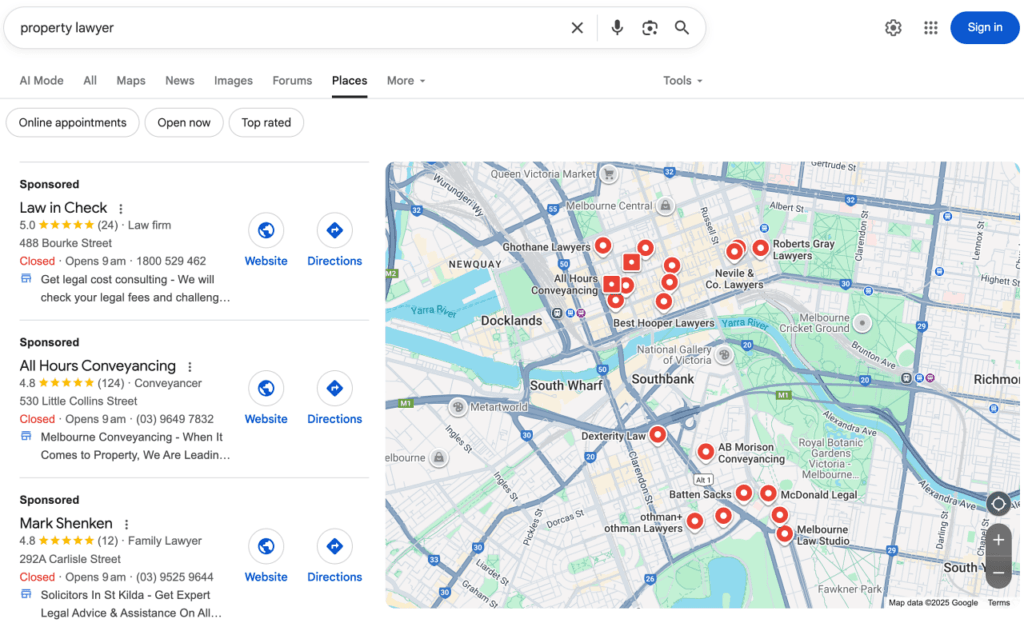
Beyond traditional Google Ads, there’s another advertising option worth considering: Google Local Service Ads (LSAs).
Local Service Ads appear at the very top of Google search results – above even traditional Google Ads. They’re specifically designed for local service providers, including lawyers.
How they’re different:
- You pay per lead (phone call or message), not per click
- Google verifies your business (background checks, license verification)
- You get a “Google Guaranteed” badge
- Leads come through Google’s messaging system or phone forwarding
When to consider LSAs:
- If you’re a smaller firm competing against bigger advertisers with larger budgets
- If you want qualified leads with lead-based pricing instead of click-based
- If you practice in areas where LSAs are available (personal injury, family law, estate planning, etc.)
LSAs aren’t a replacement for traditional Google Ads – they’re a complement. Many successful law firms run both: LSAs for local visibility and traditional PPC ads for more control and scale.
The Verdict
Running Google Ads for lawyers is a lot more than chasing cheap clicks.
It’s about building a system: choosing the right practice area to focus on, setting realistic budgets, structuring campaigns properly, writing compelling ad copy, creating landing pages that convert, tracking every form and phone call, and using that data to refine and improve over time.
Strategic Google Ads management combined with proper tracking and ongoing optimisation can turn even modest budgets into a reliable source of qualified leads.
Do that well – even in ultra-competitive niches like personal injury or car accident lawyer markets – and you can compete with much larger firms, maintain strong profitability, and turn Google Ads into a reliable, long-term growth engine.
If you want to generate website traffic that actually converts into paying clients, you need to follow these fundamentals. The law firms that succeed with Google advertising are the ones that treat it as a long-term digital marketing strategy, not a quick fix.
If you’d like help applying this framework to your own firm – from strategy and structure through to call tracking, landing pages, and ongoing Google Ads management – that’s exactly what we do every day.
Need a second opinion on your current ad strategy?
Get a free Google Ads audit of your google ads account – done by a real Aussie, not a bot. We’ll show you exactly where you’re leaving money on the table and what you can do about it.
We’ve been helping law firms across Australia – from personal injury to family law to specialised practices – turn Google AdWords into their most profitable marketing channel since 2014.
Whether you’re spending $3,000 or $30,000 per month, we’ll show you how to get more qualified leads from your target audience without wasting ad spend.